

Moises: The Musician's AI App

50M+
Installs
Moises Systems
Developer
-
Entertainment
Category
-
Everyone
Content Rating
-
https://app.moises.ai/privacy
Privacy Policy
Screenshots
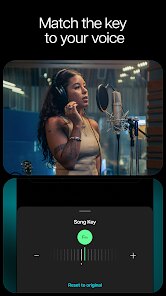
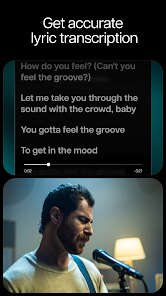
editor reviews
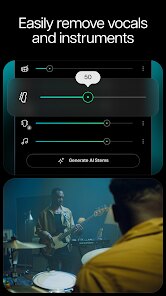
Moises is a music production and practice tool that uses artificial intelligence to separate audio tracks, allowing musicians to isolate vocals, drums, bass, and other instruments from any song. The app is designed for musicians, producers, vocalists, and music learners who need to practice along with commercial tracks, extract stems for remixing, or analyze song structures. It solves the common problem of not having access to multitrack recordings, giving users the ability to split any audio file into individual components with impressive accuracy.
Core features include real-time vocal and instrument separation, pitch and tempo adjustment, chord detection, and a built-in recorder. The AI-powered stem separation works surprisingly well, even on older recordings with less defined mixing. I found the pitch shifting particularly useful for vocal practice when a song was originally in a key that didn't fit my range. The space audio feature, which uses spatial audio processing, adds an interesting layer for those using headphones during practice sessions. For producers working on remixes, the ability to export stems as individual files is a huge time saver, though the quality of separation does vary depending on the complexity of the original mix.
This app is best suited for musicians who regularly practice covers, vocalists learning new songs, and hobbyist producers experimenting with remixes. It is especially useful during rehearsals when you need to remove or adjust specific instruments from backing tracks. However, if you are looking for studio-grade stem separation for professional mixing, the limitations might become apparent in dense arrangements or songs with heavy distortion.
features
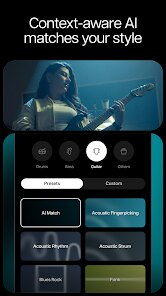
- 🎵 Intelligent Stem Separation: The core functionality lets you split any audio file into four distinct tracks: vocals, drums, bass, and "other" instruments. You can solo or mute each stem independently, which is fantastic for isolating specific parts during practice. The separation quality is generally clean, though it sometimes struggles with overlapping frequencies in rock or metal genres. For pop and electronic music, the results are surprisingly clear and usable.
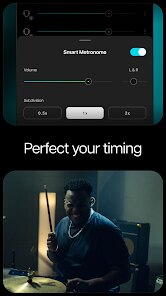
- 🎵 Smart Metronome and Tempo Control: The app automatically detects the BPM of any track and lets you adjust the tempo without affecting pitch. This is a game-changer for musicians learning complex passages. You can slow down a fast solo to half speed while maintaining the original pitch quality. The metronome syncs perfectly with the separated stems, so you can practice with a click track tailored to the original arrangement.
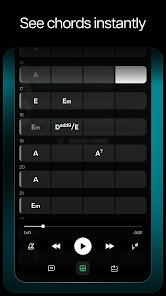
- 🎵 Chord Detection and Key Analysis: Moises visualizes chord progressions in real-time as the song plays. It displays both standard chord names and guitar chord diagrams. This feature helped me quickly figure out the harmonic structure of songs I wanted to cover. The detection is accurate for simple chord progressions but can miss some passing chords or extended harmonies in jazz pieces.
- 🎵 Lyric Transcription and Sync: The app provides automatic lyric recognition that scrolls in sync with the music. It works well for clear vocal recordings with minimal background noise. I used this feature to learn the lyrics to a foreign language song, though it occasionally misheard words in dense mixes or heavily accented vocals. You can manually edit any transcription errors directly in the app.
pros
- 👍 Accurate stem separation that actually works in real-time on mobile devices without needing cloud processing.
- 👍 Clean, intuitive interface that even beginners can navigate without a steep learning curve.
- 👍 Versatile practice tools including pitch shifting, loop sections, and adjustable speed that all function smoothly together.
- 👍 Export options that allow you to save individual stems as high-quality audio files for external use in DAWs.
cons
- 👎 Free tier has a strict daily limit on audio processing, which feels restrictive if you need to work through multiple songs in one session.
- 👎 Stem separation quality drops noticeably on older recordings or tracks with heavy distortion and frequency overlap.
- 👎 Chord detection struggles with complex jazz chords, extended harmonies, or songs with rapid key changes.
- 👎 No offline processing option means you always need an internet connection for the separation feature to work.
Recommended Apps
![]()
Astra - Life Advice
Vert Media Partners4.4
![]()
Question.AI - Chatbot&Math AI
D3 DIMENSION TECHNOLOGY PTE.LTD.4.5
![]()
Anima
ChristopherMoore03.2![]()
Suno - AI Music & Songs Maker
Suno, Inc4.8![]()
Name Meaning
Dexati4.1![]()
Reface: Face Swap & AI Videos
NEOCORTEXT, INC.4![]()
Astroscope: Astrology Guide
Astroscope App4.5![]()
Passport Parking
Passport Labs, Inc.2.5![]()
AXS Tickets
AXS, LLC4.2![]()
Call Santa Claus & Prank Call
WELLY GLOBAL PUBLISHING3.5![]()
PawAI: AI Cartoon Pet Filter
Now Tech3.1![]()
Waymo
Waymo LLC4.9![]()
Live football TV
Findy360 Software LLC3.7![]()
Pedometer - Step Counter
Simple Design Ltd.4.8![]()
Face Live Camera: Face Filters
Lyrebird Studio4.1














You May Like
-
![]()
FORCETELLER Astrology & Saju
Team UN7QI34.5 -
![]()
Daily Horoscope & Astrology
TELEMAQUE4.2 -
![]()
Yahoo Sports: Scores & News
Yahoo4.7 -
![]()
Uber Eats: Food Delivery
Uber Technologies, Inc.4.3 -
![]()
How I will die - Predict death
Bimdu3.2 -
![]()
Quiz Reels: Filter Challenge
Now Tech3.9 -
![]()
Broken Screen 4K Funny Pranks
Braly JSC4.1 -
![]()
Prisma3D - Animation, Modeling
Prisma3D2.8 -
![]()
Wonder - LGBTQ+ Dating App
Bumpy Inc.4.3 -
![]()
PicSo – Customize Your AI Girl
Meta Insight3.7 -
![]()
Plant App - Plant Identifier
ScaleUp4.6 -
![]()
Software Update for my phone
Art & Tool Studio4.1 -
![]()
Kling AI: AI Image&Video Maker
Lohas Games Pte. Ltd.4.4 -
![]()
Google Home
Google LLC4.2 -
![]()
Fingerprint Scan Simulator
Dream-Up3.6















Disclaimer
1.Apponbest does not represent any developer, nor is it the developer of any App or game.
2.Apponbest provide custom reviews of Apps written by our own reviewers, and detailed information of these Apps, such as developer contacts, ratings and screenshots.
3. All trademarks, registered trademarks, brand names and company names or logos appearing on the site are the property of their respective owners.
4.Apponbest abides by the federal Digital Millennium Copyright Act (DMCA) by responding to notices of alleged infringement that complies with the DMCA and other applicable laws.
5.If you are the owner or copyright representative and want to delete your information, please contact us [email protected].
6.All the information on this website is strictly observed all the terms and conditions of Google Ads Advertising policies and Google Unwanted Software policy.
7.apponbest.com is an independent, information-only website which is 100% free to all the users.



























