
Skin Editor 3D for Minecraft

10M+
Installs
Remoro Studios
Developer
-
Productivity
Category
-
Rated for 3+
Content Rating
-
http://remoro-studios.com/privacy_policy
Privacy Policy
Screenshots
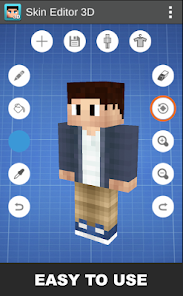
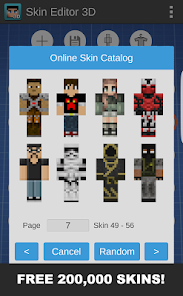
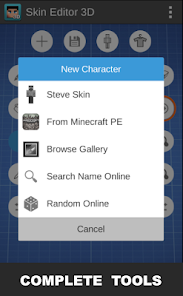
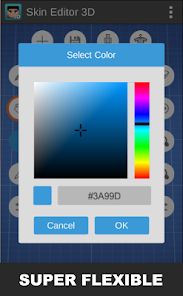
editor reviews
Skin Editor 3D for Minecraft by Remoro Studios is a powerful and intuitive mobile application designed for one primary purpose: to create, edit, and customize 3D character skins for Minecraft. It moves beyond the limitations of the game's built-in 2D skin editor by providing a fully rotatable, three-dimensional model of a Minecraft character. This allows creators to see exactly how their designs will wrap around the character's body in real-time, eliminating the guesswork associated with flat templates. The app serves as a comprehensive digital workshop for Minecraft enthusiasts who want to express their unique identity within the blocky world.
The target user group is broad, encompassing everyone from young players wanting to make a simple, personalized avatar to seasoned digital artists crafting intricate, detailed skins for public download. It solves the specific problem of accessibility and precision in skin creation. Previously, creating complex skins often required desktop software or meticulous work on confusing 2D maps. This app democratizes the process, putting a professional-grade 3D editing suite directly into the palms of users. It empowers creativity by making the technical hurdles of skin mapping virtually disappear.
The core feature of real-time 3D editing works exceptionally well. The model is responsive, and changes made on the 2D texture map are instantly reflected on the 3D model. Additional features like a vast built-in library of pre-made skins, color palettes, symmetry tools, and layer-based editing add tremendous value. They don't feel like gimmicks; they are practical tools that accelerate the creative workflow. In my own usage, I was able to recreate a favorite comic book character's costume with surprising accuracy. The layer system was invaluable for adding details like logos and armor trim without disturbing the base colors. It solved my need for a precise, portable tool to prototype skin ideas quickly, something I couldn't do with other apps or the default game options.
I would strongly recommend this app to any Minecraft player who has ever wanted a skin that doesn't exist online or who enjoys creative customization. It is most useful for users who value visual precision and a hands-on, immediate creative process. Whether you are a parent helping a child design their first avatar, a member of a server looking to create matching team skins, or an artist building a portfolio of custom designs, Skin Editor 3D provides the perfect toolkit. Its utility shines in scenarios where trial-and-error and real-time visualization are key to achieving the desired result.
features
- 🛠️ Real-Time 3D Modeling & Editing: The cornerstone of the app is its interactive 3D character model. You can rotate, zoom, and pan around your creation to view it from any angle. As you paint on the 2D skin template, every stroke is instantly projected onto the 3D model. This immediate visual feedback is transformative, allowing for precise placement of complex patterns, gradients, and details that would be nearly impossible to plan on a static 2D grid alone.
- 🛠️ Advanced Layer & Symmetry System: Moving beyond basic painting, the app incorporates a non-destructive layer system similar to professional graphic software. You can create separate layers for different costume elements—like a base layer for skin, another for clothing, and another for accessories. This allows for easy editing and experimentation. Coupled with powerful symmetry tools that mirror your edits across the X and Y axes, creating perfectly balanced designs is effortless and efficient.
- 🛠️ Comprehensive Resource Library & Sharing: The app includes an extensive in-app gallery filled with thousands of community-made and official skins, which can be used as-is or imported as a starting point for your own edits. Once your masterpiece is complete, the app seamlessly integrates with the Minecraft ecosystem. You can export the skin file directly to your device, apply it to your own character through the Minecraft app, or even share your creation with the global community through online platforms with just a few taps.
- 🛠️ Professional-Grade Editing Tools: It offers a suite of tools that cater to both beginners and pros. This includes a precise color picker and palette manager, a fill bucket for large areas, multiple brush sizes and hardness settings, and an eraser. The interface allows you to switch between the 2D UV map view and the 3D model view instantly, giving you complete control over every pixel of your design from the perspective that suits your current task best.
pros
- 🌟 Unmatched Visual Precision: The real-time 3D preview is a game-changer. It completely eliminates the frustration of designing on a flat template only to find errors once the skin is applied in-game. This feature alone sets it miles ahead of any other mobile skin editor.
- 🌟 Intuitive and Accessible Workflow: Despite its powerful features, the user interface is clean and logically organized. The learning curve is gentle, allowing newcomers to start creating immediately, while the depth of tools like layers satisfies advanced users.
- 🌟 All-in-One Creative Hub: It successfully combines a creator studio, a vast inspiration library, and a sharing platform into one seamless application. You can go from a blank slate to a shared, in-game skin without ever leaving the app.
- 🌟 Performance and Stability: The app runs smoothly on most modern devices, with the 3D model rendering quickly and without significant lag, ensuring a fluid and enjoyable creative experience.
cons
- ⚠️ Premium Feature Barrier: While the free version is functional, many of the most powerful tools—like advanced layers, certain symmetry modes, and the full resource library—are locked behind a one-time purchase or subscription. This can feel limiting for users who want to explore the app's full potential without commitment.
- ⚠️ Steep Learning for Advanced Techniques: Mastering the layer system and understanding how the 2D UV map correlates to complex 3D areas (like the head or limbs) can be initially confusing. The app could benefit from more interactive tutorials for these advanced concepts.
- ⚠️ Device Dependency: On older or less powerful mobile devices, rendering the detailed 3D model in real-time can sometimes cause slowdowns or reduced responsiveness, which can interrupt the creative flow.
- ⚠️ Limited Export Format Options: The app is primarily optimized for direct use with Minecraft. Users looking to export their skin textures for use in other games or 3D modeling software might find the format options somewhat restrictive.
Recommended Apps
![]()
Astra - Life Advice
Vert Media Partners4.4
![]()
Question.AI - Chatbot&Math AI
D3 DIMENSION TECHNOLOGY PTE.LTD.4.5
![]()
Anima
ChristopherMoore03.2![]()
Suno - AI Music & Songs Maker
Suno, Inc4.8![]()
Name Meaning
Dexati4.1![]()
Reface: Face Swap & AI Videos
NEOCORTEXT, INC.4![]()
Astroscope: Astrology Guide
Astroscope App4.5![]()
Passport Parking
Passport Labs, Inc.2.5![]()
AXS Tickets
AXS, LLC4.2![]()
Call Santa Claus & Prank Call
WELLY GLOBAL PUBLISHING3.5![]()
PawAI: AI Cartoon Pet Filter
Now Tech3.1![]()
Waymo
Waymo LLC4.9![]()
Live football TV
Findy360 Software LLC3.7![]()
Pedometer - Step Counter
Simple Design Ltd.4.8![]()
Face Live Camera: Face Filters
Lyrebird Studio4.1














You May Like
-
![]()
FORCETELLER Astrology & Saju
Team UN7QI34.5 -
![]()
Daily Horoscope & Astrology
TELEMAQUE4.2 -
![]()
Yahoo Sports: Scores & News
Yahoo4.7 -
![]()
Uber Eats: Food Delivery
Uber Technologies, Inc.4.3 -
![]()
How I will die - Predict death
Bimdu3.2 -
![]()
Quiz Reels: Filter Challenge
Now Tech3.9 -
![]()
Broken Screen 4K Funny Pranks
Braly JSC4.1 -
![]()
Prisma3D - Animation, Modeling
Prisma3D2.8 -
![]()
Wonder - LGBTQ+ Dating App
Bumpy Inc.4.3 -
![]()
PicSo – Customize Your AI Girl
Meta Insight3.7 -
![]()
Plant App - Plant Identifier
ScaleUp4.6 -
![]()
Software Update for my phone
Art & Tool Studio4.1 -
![]()
Kling AI: AI Image&Video Maker
Lohas Games Pte. Ltd.4.4 -
![]()
Google Home
Google LLC4.2 -
![]()
Fingerprint Scan Simulator
Dream-Up3.6














Disclaimer
1.Apponbest does not represent any developer, nor is it the developer of any App or game.
2.Apponbest provide custom reviews of Apps written by our own reviewers, and detailed information of these Apps, such as developer contacts, ratings and screenshots.
3. All trademarks, registered trademarks, brand names and company names or logos appearing on the site are the property of their respective owners.
4.Apponbest abides by the federal Digital Millennium Copyright Act (DMCA) by responding to notices of alleged infringement that complies with the DMCA and other applicable laws.
5.If you are the owner or copyright representative and want to delete your information, please contact us [email protected].
6.All the information on this website is strictly observed all the terms and conditions of Google Ads Advertising policies and Google Unwanted Software policy.
7.apponbest.com is an independent, information-only website which is 100% free to all the users.



























