

Emoji background changer

10M+
Installs
Judi Studio
Developer
-
Video Players & Editors
Category
-
Rated for 3+
Content Rating
-
https://sites.google.com/view/emojibackgroundchangerprivatep/home
Privacy Policy
Screenshots


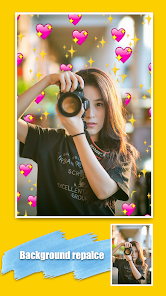
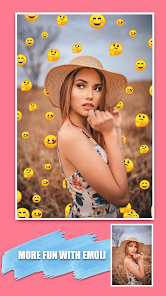
editor reviews
Emoji Background Changer, developed by Judi Studio, is a specialized utility app that focuses on a single, highly specific task: replacing the solid color backgrounds of standard emoji with custom images or patterns. Its core purpose is to allow users to personalize their digital communication by creating unique, visually distinct emoji that stand out in messaging apps and social media. The app addresses a niche but growing desire for more personalized expression beyond the standard emoji sets provided by platforms like iOS and Android.
The target user is anyone who frequently uses emoji and wants to add a layer of personal flair to their messages. This could include social media influencers, content creators, teenagers in group chats, or professionals looking to add a branded touch to their communications. It solves the problem of emoji uniformity, offering a tool to break away from the generic look and inject personality into every 'thumbs up' or 'heart' sent.
The core feature works exceptionally well. The process is intuitive: select an emoji, choose or take a photo for the background, and the app seamlessly replaces the default background. The edge detection and cropping are generally precise, resulting in clean, shareable images. Additional features like adding text or simple stickers add modest value for creating meme-like content. In my own use, it proved perfect for creating a set of emoji with my pet's photo as the background, which became a fun inside joke with my family group chat. It solved the need for a quick, lightweight graphic design tool specifically for emoji customization without the complexity of full-fledged editing software.
I would recommend this app primarily to younger users who are deeply engaged in visual messaging on platforms like Instagram, Snapchat, or TikTok, and to individuals or small communities looking to create a shared visual language. It is most useful in casual, personal communication scenarios where humor, inside jokes, and personal branding are valued over formal interaction.
features
- 🎨 Core Background Replacement: The app's primary function allows you to select any emoji from a comprehensive library and replace its monochrome backdrop with any image from your camera roll. The masking technology is efficient, preserving the emoji's foreground details while cleanly swapping out the background layer.
- 📸 Integrated Camera & Gallery Access: You can instantly capture a new photo to use as a background or browse your existing album for the perfect picture. This seamless integration makes the creative process fluid, whether you want to use a live scene or a cherished memory.
- ✏️ Basic Decorative Tools: Beyond just background swapping, the app includes simple editing tools like text overlay with various fonts and a selection of decorative stickers or frames. These let you annotate your custom emoji or add extra humorous elements before saving or sharing.
- 📤 Direct Sharing Functionality: Once your custom emoji is created, the app provides one-tap sharing options to all major social media platforms and messaging apps. This eliminates the need to save to your camera roll first and manually upload, streamlining the process of showing off your creations.
pros
- ⚡ Remarkably Simple and Fast: The user interface is stripped-down and focused. Achieving the core task—creating a custom emoji—takes just a few seconds, making it ideal for quick, on-the-fly creativity.
- 🎯 Excellent Single-Purpose Focus: It doesn't try to be a full photo editor. This dedicated focus means it performs its one job very well without unnecessary bloat or confusing extra menus.
- 🔄 High-Quality Output: The final images are rendered in good resolution with sharp edges on the emoji, ensuring they look crisp when sent to friends or posted online.
cons
- 📱 Limited Export Formats: The app saves creations only as image files. There's no option to create a custom keyboard pack or GIF set, meaning each emoji must be sent as a separate picture, which can be less convenient than using native emoji.
- 🛠️ Very Basic Editing Suite: The text and sticker tools are quite rudimentary. Users looking for advanced effects, layer blending, or finer artistic control will find the feature set too limited.
- 🔒 Potential Privacy Consideration: Since the app requires full access to your photo library to function, users who are cautious about data permissions might hesitate, even though this is standard for such utility apps.
Recommended Apps
![]()
Astra - Life Advice
Vert Media Partners4.4
![]()
Question.AI - Chatbot&Math AI
D3 DIMENSION TECHNOLOGY PTE.LTD.4.5
![]()
Anima
ChristopherMoore03.2![]()
Suno - AI Music & Songs Maker
Suno, Inc4.8![]()
Name Meaning
Dexati4.1![]()
Reface: Face Swap & AI Videos
NEOCORTEXT, INC.4![]()
Astroscope: Astrology Guide
Astroscope App4.5![]()
Passport Parking
Passport Labs, Inc.2.5![]()
AXS Tickets
AXS, LLC4.2![]()
Call Santa Claus & Prank Call
WELLY GLOBAL PUBLISHING3.5![]()
PawAI: AI Cartoon Pet Filter
Now Tech3.1![]()
Waymo
Waymo LLC4.9![]()
Live football TV
Findy360 Software LLC3.7![]()
Pedometer - Step Counter
Simple Design Ltd.4.8![]()
Face Live Camera: Face Filters
Lyrebird Studio4.1














You May Like
-
![]()
FORCETELLER Astrology & Saju
Team UN7QI34.5 -
![]()
Daily Horoscope & Astrology
TELEMAQUE4.2 -
![]()
Yahoo Sports: Scores & News
Yahoo4.7 -
![]()
Uber Eats: Food Delivery
Uber Technologies, Inc.4.3 -
![]()
How I will die - Predict death
Bimdu3.2 -
![]()
Quiz Reels: Filter Challenge
Now Tech3.9 -
![]()
Broken Screen 4K Funny Pranks
Braly JSC4.1 -
![]()
Prisma3D - Animation, Modeling
Prisma3D2.8 -
![]()
Wonder - LGBTQ+ Dating App
Bumpy Inc.4.3 -
![]()
PicSo – Customize Your AI Girl
Meta Insight3.7 -
![]()
Plant App - Plant Identifier
ScaleUp4.6 -
![]()
Software Update for my phone
Art & Tool Studio4.1 -
![]()
Kling AI: AI Image&Video Maker
Lohas Games Pte. Ltd.4.4 -
![]()
Google Home
Google LLC4.2 -
![]()
Fingerprint Scan Simulator
Dream-Up3.6















Disclaimer
1.Apponbest does not represent any developer, nor is it the developer of any App or game.
2.Apponbest provide custom reviews of Apps written by our own reviewers, and detailed information of these Apps, such as developer contacts, ratings and screenshots.
3. All trademarks, registered trademarks, brand names and company names or logos appearing on the site are the property of their respective owners.
4.Apponbest abides by the federal Digital Millennium Copyright Act (DMCA) by responding to notices of alleged infringement that complies with the DMCA and other applicable laws.
5.If you are the owner or copyright representative and want to delete your information, please contact us [email protected].
6.All the information on this website is strictly observed all the terms and conditions of Google Ads Advertising policies and Google Unwanted Software policy.
7.apponbest.com is an independent, information-only website which is 100% free to all the users.



























