
GPS Camera Timestamp & Geotag

10K+
Installs
Betasoft Mobile
Developer
-
Productivity
Category
-
Everyone
Content Rating
-
https://sites.google.com/betasoftmobile.com/policy-remote-control-for-tv
Privacy Policy
Screenshots

editor reviews
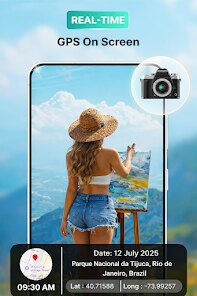
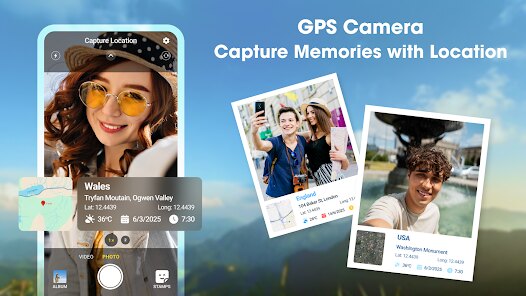
If you've ever needed to prove exactly when and where a photo was taken—whether for insurance claims, property documentation, construction progress tracking, or even sharing vacation memories with embedded location data—GPS Camera Timestamp & Geotag from Betasoft Mobile is designed specifically for that purpose. The app essentially transforms your phone's camera into a forensic-grade documentation tool by permanently stamping each image with customizable date, time, GPS coordinates, map view, address, and even custom text overlays. This is one of those rare utility apps that does exactly what it promises without overcomplicating things.
What stands out is how effectively the core function works. You open the app, point your camera, and the stamp information is burned directly onto the photo before it's saved—no manual editing or watermarking after the fact. The app pulls live GPS data and automatically resolves your current address, which is impressive for a free tool. It also lets you choose between a simple timestamp or a full block of information including latitude/longitude, street address, and even altitude. The batch mode and photo import features are particularly useful if you're retroactively applying stamps to images taken with your regular camera app, though you do lose some precision with imported photos since the GPS info isn't embedded in them. On a personal note, I used this app to document some damage around my rental property before moving out, and it saved me from a deposit dispute. That kind of peace of mind is hard to put a price on.
I'd recommend this app to real estate agents, insurance adjusters, surveyors, field workers, or anyone who needs tamper-proof visual records. It's especially useful for travelers who want to keep a geographic diary of their trips, or for parents documenting car accidents or neighborhood incidents. If your job or hobby requires verifiable photo evidence, this is a solid choice.
features
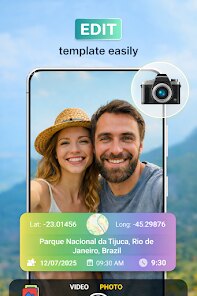
- 📸 The timestamp and geotag stamp is burned directly onto the image in real time. You can customize the stamp position, font size, color, opacity, and exactly which data fields to include—date, time, GPS coordinates, altitude, map thumbnail, address, or even a custom memo. The stamp renders with high clarity and doesn't degrade image quality, which is crucial for professional use.
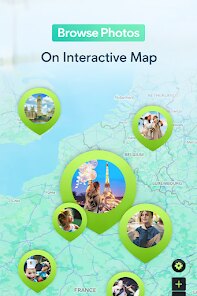
- 🗺️ The built-in GPS address resolution is surprisingly accurate. The app uses your device's GPS receiver to capture coordinates, then reverse-geocodes them into a readable street address. In my testing, it correctly identified my building number and street name in a dense urban area, and it worked reasonably well in suburban locations too. You can also toggle between showing just coordinates or a full address with map preview.
- 🔄 The batch stamping and gallery import feature is a big time-saver. Instead of taking every photo inside the app, you can import existing images from your camera roll and apply timestamps retroactively. The app also allows you to process multiple photos at once in batch mode. Just keep in mind that imported photos will only show the date and time they were imported unless they have embedded EXIF metadata—the app does read EXIF data, but it's not always consistent across all file formats.
pros
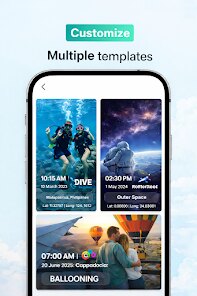
- ✅ The stamp customization is extremely flexible—you can adjust text size, color, opacity, and position, and even choose between a minimal timestamp or a full data block.
- ✅ It works offline once GPS is locked, so you don't need mobile data to capture or stamp photos in remote areas.
- ✅ The app is completely free with no watermarks, and ads are minimal and non-intrusive compared to similar tools.
- ✅ It supports both front and rear cameras, with the stamp automatically adjusting orientation.
cons
- ❌ The camera interface feels a bit dated and lacks manual controls like exposure compensation or focus lock, which would be useful in low-light conditions.
- ❌ GPS lock can be slow indoors or in dense urban canyons, sometimes taking 10-15 seconds to get a fix.
- ❌ Imported photos may not always have accurate EXIF data read correctly, especially images edited or compressed by other apps, leading to incorrect timestamps.
- ❌ The address resolution occasionally fails in rural areas or non-English speaking countries, showing only coordinates instead.
Recommended Apps
![]()
Astra - Life Advice
Vert Media Partners4.4
![]()
Question.AI - Chatbot&Math AI
D3 DIMENSION TECHNOLOGY PTE.LTD.4.5
![]()
Anima
ChristopherMoore03.2![]()
Suno - AI Music & Songs Maker
Suno, Inc4.8![]()
Name Meaning
Dexati4.1![]()
Reface: Face Swap & AI Videos
NEOCORTEXT, INC.4![]()
Astroscope: Astrology Guide
Astroscope App4.5![]()
Passport Parking
Passport Labs, Inc.2.5![]()
AXS Tickets
AXS, LLC4.2![]()
Call Santa Claus & Prank Call
WELLY GLOBAL PUBLISHING3.5![]()
PawAI: AI Cartoon Pet Filter
Now Tech3.1![]()
Waymo
Waymo LLC4.9![]()
Live football TV
Findy360 Software LLC3.7![]()
Pedometer - Step Counter
Simple Design Ltd.4.8![]()
Face Live Camera: Face Filters
Lyrebird Studio4.1















You May Like
-
![]()
FORCETELLER Astrology & Saju
Team UN7QI34.5 -
![]()
Daily Horoscope & Astrology
TELEMAQUE4.2 -
![]()
Yahoo Sports: Scores & News
Yahoo4.7 -
![]()
Uber Eats: Food Delivery
Uber Technologies, Inc.4.3 -
![]()
How I will die - Predict death
Bimdu3.2 -
![]()
Quiz Reels: Filter Challenge
Now Tech3.9 -
![]()
Broken Screen 4K Funny Pranks
Braly JSC4.1 -
![]()
Prisma3D - Animation, Modeling
Prisma3D2.8 -
![]()
Wonder - LGBTQ+ Dating App
Bumpy Inc.4.3 -
![]()
PicSo – Customize Your AI Girl
Meta Insight3.7 -
![]()
Plant App - Plant Identifier
ScaleUp4.6 -
![]()
Software Update for my phone
Art & Tool Studio4.1 -
![]()
Kling AI: AI Image&Video Maker
Lohas Games Pte. Ltd.4.4 -
![]()
Google Home
Google LLC4.2 -
![]()
Fingerprint Scan Simulator
Dream-Up3.6















Disclaimer
1.Apponbest does not represent any developer, nor is it the developer of any App or game.
2.Apponbest provide custom reviews of Apps written by our own reviewers, and detailed information of these Apps, such as developer contacts, ratings and screenshots.
3. All trademarks, registered trademarks, brand names and company names or logos appearing on the site are the property of their respective owners.
4.Apponbest abides by the federal Digital Millennium Copyright Act (DMCA) by responding to notices of alleged infringement that complies with the DMCA and other applicable laws.
5.If you are the owner or copyright representative and want to delete your information, please contact us [email protected].
6.All the information on this website is strictly observed all the terms and conditions of Google Ads Advertising policies and Google Unwanted Software policy.
7.apponbest.com is an independent, information-only website which is 100% free to all the users.



























