Custom Kicks

100K+
Installs
Sneakerz
Developer
-
Entertainment
Category
-
Everyone
Content Rating
-
http://sneakerz.dev/privacy-policy/
Privacy Policy
Screenshots
editor reviews
The app world is absolutely flooded with sneaker-related tools, so anytime a new one drops, I brace myself for yet another glorified stock-checker or a marketplace that barely works. Custom Kicks, from the team at Sneakerz, aims to carve out a very specific niche. It's not designed to help you buy or sell the latest Yeezy drop. Instead, its core purpose is to be a digital sandbox for shoe customizers, aspiring designers, and hobbyists who dream of creating their own colorways. The app addresses a real problem for this group: the gap between an idea scrawled on a napkin and the reality of a finished painted shoe. Before this, you either needed expensive 3D modeling software or you just had to guess. This app gives you a visual playground to test out colors, materials, and patterns without touching a drop of paint.
In terms of performance, the core feature works better than I initially expected. The rendering engine is responsive, and you can swap color panels on different sections of a shoe model (like the toe, heel, and laces) with satisfying speed. It doesn't feel clunky or laggy, which is a huge plus for a mobile utility. The additional features, particularly the ability to save and share your designs, add real value. It turns a solo project into a social one. For me, personally, this app solved a specific issue. I've had a pair of white Air Force 1s sitting in my closet for months because I couldn't commit to a color scheme. I spent two hours in Custom Kicks trying out neon accents against a black base, and I finally landed on a design I was confident enough to execute. That alone saved me from buying the wrong paint set.
I would recommend Custom Kicks to anyone who is serious about customizing shoes or even just curious about the art form. It's perfect for the beginner who is scared to mess up a good pair of sneakers, as it provides a risk-free way to learn. It is also surprisingly useful for more experienced artists who want to mock up a design quickly for a client or for their own inspiration. This app is most useful when you are in the brainstorming phase of a project. It's less useful for tracking inventory or prices—that's not its job. If you're looking for a tool to get the creative juices flowing and visualize a unique pair of kicks before the brush hits the leather, this is exactly what you need.
features
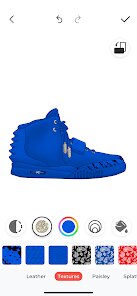
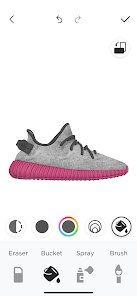
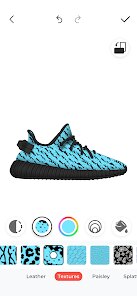
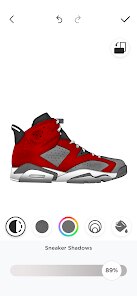
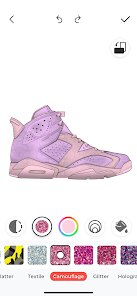
- 🎨 The core design tool is a genuine joy to use. The app presents a high-quality 3D model of the shoe (currently limited to a few popular silhouettes like the Air Force 1 and Jordan 1). You tap on any part of the shoe—the mudguard, the eyelet panel, the tongue—and a color wheel pops up. The selection is broad, covering standard colors, metallics, and even a decent range of neon and pastel shades. The best part is the live preview; as you slide your finger across the color spectrum, the shoe model repaints in real time. It's intuitive. You don't need a manual. It mimics the physical act of testing a paint on a small area, but without the mess or the commitment.
- 📱 The social sharing and gallery integration is surprisingly robust. After you finish a design, the app generates a clean, high-resolution render from multiple angles. You can then share it directly to Instagram, Reddit, or save it to your camera roll. The app also hosts a community gallery where users post their designs. This is more than just a “like” machine; you can actually download another user's colorway as a starting point for your own project. It's a clever way to foster collaboration and inspiration within the app, turning a solitary design process into a community-driven experience. It's nice to see a concept you liked from someone else and then put your own spin on it.
- 💾 The layer and history system is a lifesaver for anyone who gets deep into a design. You aren't just painting aimlessly. The app tracks every change you make. You can step back through your design history, undoing specific color changes without having to restart the whole shoe. You can also lock certain parts of the shoe, like if you're happy with the midsole but want to experiment with the upper, you can lock the midsole and paint away without fear. This granular control is what separates a professional tool from a toy. It encourages experimentation because you know you can always revert to a previous state.
pros
- 👍 The interface is incredibly clean and free of clutter. There are no paywalls for basic colors or materials, which is a breath of fresh air in the “freemium” app landscape. You get the full toolkit right away.
- 👍 The rendering quality is noticeably better than similar apps. The lighting and texture on the 3D model make the colors look realistic, giving you confidence that your final paint job will actually look like the screen mockup.
- 👍 It's a fantastic educational tool. By playing with the color combos, you naturally learn about sneaker anatomy and how different color placements affect the overall aesthetic of the shoe.
cons
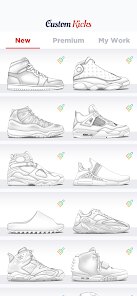
- 👎 The selection of base shoe models is extremely limited. Currently, you can only design on about six different silhouettes. If you wear New Balance or Asics, you are out of luck. This significantly narrows the app's usefulness for anyone who doesn't wear Nike or Jordan.
- 👎 The app lacks any kind of material texture simulation. You can change the color of the suede section, but it still looks like smooth leather on the screen. You can't see how a matte black finish would look versus a glossy one, which is a huge gap for customizers who use different paints.
- 👎 There is no export option for 3D files. You can only get images. If you want to 3D print a lace tag or a custom part, you can't. The app keeps the design locked inside its own ecosystem, which feels restrictive for serious creators.
Recommended Apps
![]()
Astra - Life Advice
Vert Media Partners4.4
![]()
Question.AI - Chatbot&Math AI
D3 DIMENSION TECHNOLOGY PTE.LTD.4.5
![]()
Anima
ChristopherMoore03.2![]()
Suno - AI Music & Songs Maker
Suno, Inc4.8![]()
Name Meaning
Dexati4.1![]()
Reface: Face Swap & AI Videos
NEOCORTEXT, INC.4![]()
Astroscope: Astrology Guide
Astroscope App4.5![]()
Passport Parking
Passport Labs, Inc.2.5![]()
AXS Tickets
AXS, LLC4.2![]()
Call Santa Claus & Prank Call
WELLY GLOBAL PUBLISHING3.5![]()
PawAI: AI Cartoon Pet Filter
Now Tech3.1![]()
Waymo
Waymo LLC4.9![]()
Live football TV
Findy360 Software LLC3.7![]()
Pedometer - Step Counter
Simple Design Ltd.4.8![]()
Face Live Camera: Face Filters
Lyrebird Studio4.1













You May Like
-
![]()
FORCETELLER Astrology & Saju
Team UN7QI34.5 -
![]()
Daily Horoscope & Astrology
TELEMAQUE4.2 -
![]()
Yahoo Sports: Scores & News
Yahoo4.7 -
![]()
Uber Eats: Food Delivery
Uber Technologies, Inc.4.3 -
![]()
How I will die - Predict death
Bimdu3.2 -
![]()
Quiz Reels: Filter Challenge
Now Tech3.9 -
![]()
Broken Screen 4K Funny Pranks
Braly JSC4.1 -
![]()
Prisma3D - Animation, Modeling
Prisma3D2.8 -
![]()
Wonder - LGBTQ+ Dating App
Bumpy Inc.4.3 -
![]()
PicSo – Customize Your AI Girl
Meta Insight3.7 -
![]()
Plant App - Plant Identifier
ScaleUp4.6 -
![]()
Software Update for my phone
Art & Tool Studio4.1 -
![]()
Kling AI: AI Image&Video Maker
Lohas Games Pte. Ltd.4.4 -
![]()
Google Home
Google LLC4.2 -
![]()
Fingerprint Scan Simulator
Dream-Up3.6













Disclaimer
1.Apponbest does not represent any developer, nor is it the developer of any App or game.
2.Apponbest provide custom reviews of Apps written by our own reviewers, and detailed information of these Apps, such as developer contacts, ratings and screenshots.
3. All trademarks, registered trademarks, brand names and company names or logos appearing on the site are the property of their respective owners.
4.Apponbest abides by the federal Digital Millennium Copyright Act (DMCA) by responding to notices of alleged infringement that complies with the DMCA and other applicable laws.
5.If you are the owner or copyright representative and want to delete your information, please contact us [email protected].
6.All the information on this website is strictly observed all the terms and conditions of Google Ads Advertising policies and Google Unwanted Software policy.
7.apponbest.com is an independent, information-only website which is 100% free to all the users.