

Pollo AI: AI Video Generator

1M+
Installs
COCOSOFT TECHNOLOGY PTE. LTD.
Developer
-
Entertainment
Category
-
Everyone
Content Rating
-
https://pollo.ai/privacy-policy
Privacy Policy
Screenshots


editor reviews
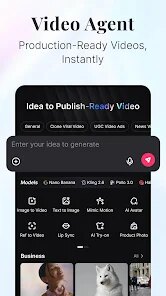
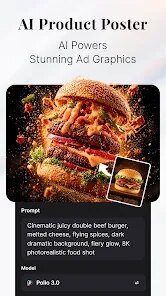
Pollo AI is a video creation platform that uses generative artificial intelligence to turn text prompts, images, and short clips into fully-formed videos. Instead of spending hours in traditional editing software, you simply describe what you want to see or upload a reference photo, and the system handles the heavy lifting of scene composition, motion, and visual style. The app is built for content creators, social media managers, small business owners, and anyone who regularly produces video but lacks the time or technical skills for complex post-production work. It solves the very real problem of producing high-volume, visually consistent video content without requiring a dedicated production team.
In practice, the core generation function works surprisingly well. I tested it by feeding in a few product photos and a short description of the mood I wanted, and the output was polished enough to drop straight into a social media feed. The most impressive part is the motion coherence: subjects stay recognizable across frames, and background elements shift in a way that feels natural rather than glitchy. The additional features, like background audio integration and automated caption placement, actually add real convenience rather than just padding the menu. On a personal level, this app has saved me from the dreaded blank timeline syndrome more times than I care to count. When I need a quick explainer loop or a product teaser, I can get something passable in under five minutes
I would recommend Pollo AI to anyone who produces short-form video regularly, especially those running social channels or e-commerce stores. It is less suited for narrative filmmaking or projects requiring precise frame-by-frame control. But for mood videos, product showcases, and repetitive ad variations, it is a genuinely useful shortcut. If your bottleneck is volume rather than creativity, this tool will feel like a weight off your shoulders.
features
- 🎨 Text-to-Video Generation: Describe a scene in plain language, and the AI builds a video that matches your description. The results are surprisingly literal and coherent, sticking closely to your prompt without wandering off into unrelated visuals. I typed “a cat walking through a neon-lit alley at night,” and got back something that actually looked like a tiny cyberpunk noir film.
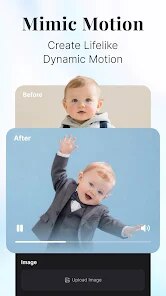
- 🖼️ Image-to-Video Animation: Upload a static image, and the AI breathes motion into it. This works especially well for product photography and character art. Facial expressions shift, backgrounds ripple with light, and objects gain subtle movement. I used it to animate a flat product shot into a living scene, and the result was clean enough for a sponsored post.
- 🎬 Style Transfer and Visual Templates: You can apply pre-set visual filters and stylistic templates that change the color palette, texture, and overall mood of your video. This feature saves time when consistency across a campaign matters. Switching from a warm, vintage look to a cold, high-contrast aesthetic takes one tap instead of ten steps in a manual editor.
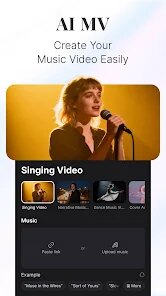
- 🔊 Integrated Audio and Caption Tools: The app lets you attach background music from a built-in library and auto-generates captions aligned to the video timeline. Both features work without extra syncing. The captions are accurate enough for casual use, and the music tracks are royalty-free, which removes a common legal headache for small creators.
pros
- ✅ Very fast output speed. Most videos render in under a minute, which makes iterative testing practical.
- ✅ Beginner-friendly interface. No timeline, no keyframes, no jargon. The whole experience feels more like a form than a studio.
- ✅ Consistent visual quality across generations. The model does not suddenly drop into low-resolution or garbled imagery midway through a session.
cons
- ❌ Limited fine-tuning. You cannot adjust motion curves, lighting angles, or timing beyond basic duration sliders.
- ❌ Repetitive outputs on similar prompts. If you generate the same description twice, the results tend to look very similar.
- ❌ Occasional artifacts on complex movements. Hands and fast transitions can still break into blurry or distorted shapes.
Recommended Apps
![]()
How Did You Die In The Past?
BuzzMoy0
![]()
Horoscopes – Daily Zodiac Horo
Mail.Ru Group4.1![]()
Wise: International Transfers
Wise Payments Ltd.4.7
![]()
GRUBL™ 4D Live Wallpapers + AI
TarrySoft4.6![]()
Accupedo Pedometer
Corusen LLC4.2![]()
Google Meet (original)
Google LLC3.9![]()
Gay Dating & LGBT Hookup App
Hookup Apps to Hook up Local Dating4.5![]()
Razor Prank (Hair Trimmer Joke
RRM Jokes, Pranks and fun apps3.6![]()
Pollo AI: AI Video Generator
COCOSOFT TECHNOLOGY PTE. LTD.4.4![]()
Reface: Face Swap & AI Videos
NEOCORTEXT, INC.4![]()
Video call Elssa
TOSSINGAME LTD0![]()
Time Warp Scan Cam&Face Filter
HDY Apps4.4![]()
Funny Prank: Monster Sound
Mirai Global Publishing0![]()
True Tarot Card Reading
KaApps4.2![]()
Wednesday Addams Prank Call
Prank Calling4








You May Like
-
![]()
Ticketmaster UK Event Tickets
Ticketmaster L.L.C.2.6 -
![]()
Google Translate
Google LLC4.2 -
![]()
HD Camera for Android
Mobile_V54.5 -
![]()
Adobe Photoshop Mix - Cut-out,
Adobe3.4 -
![]()
Klarna | Shop now. Pay later.
Klarna Bank AB (publ)4.3 -
![]()
Depression Test
Inquiry Health LLC4.5 -
![]()
Santa Prank Call: Fake video
Era Global Publishing4 -
![]()
ChatBot - AI Chat
X PhotoKit4.5 -
![]()
Live Wallpapers 3D
Joy Wallpaper5 -
![]()
Photo Editor Picsa: Collage
Lyrebird Studio4.5 -
![]()
Hulu: Stream TV shows & movies
Disney4.5 -
![]()
Prank Call: Fake Video Prank
MoranJiyounge3.7 -
![]()
Wallpapers HD - Backgrounds 4K
TarrySoft4.4 -
![]()
FaceApp: Perfect Face Editor
FaceApp Technology Ltd4.4 -
![]()
Yoshion - Pic Collage Maker
Joseph Jenny3.1














Disclaimer
1.Apponbest does not represent any developer, nor is it the developer of any App or game.
2.Apponbest provide custom reviews of Apps written by our own reviewers, and detailed information of these Apps, such as developer contacts, ratings and screenshots.
3. All trademarks, registered trademarks, brand names and company names or logos appearing on the site are the property of their respective owners.
4.Apponbest abides by the federal Digital Millennium Copyright Act (DMCA) by responding to notices of alleged infringement that complies with the DMCA and other applicable laws.
5.If you are the owner or copyright representative and want to delete your information, please contact us [email protected].
6.All the information on this website is strictly observed all the terms and conditions of Google Ads Advertising policies and Google Unwanted Software policy.
7.apponbest.com is an independent, information-only website which is 100% free to all the users.